
If you own several external hard drives, USB flash drives, or portable SSDs, you've probably encountered a frustrating problem: you know a file exists somewhere, but you can't remember which drive contains it.
Maybe it's an old family photo, a document from several years ago, or a video you archived to free up space on your computer.
Finding it often means connecting one drive, searching through folders, disconnecting it, and repeating the process with another drive.
Fortunately, there's a better way to keep track of files stored across multiple external drives.
Why Finding Files on Disconnected Drives Is Difficult
Windows File Explorer makes it easy to browse and search files on connected storage devices. But when you have several drives stored away, figuring out which one to reconnect can turn a simple search into a guessing game.
That creates a problem for anyone who uses external drives to store:
- Family photos and home videos
- Archived documents and financial records
- Old work projects and presentations
- Music and other media collections
- Files moved off a computer to free up storage space
As your collection of external drives grows, remembering where everything is stored becomes increasingly difficult.
You could maintain a spreadsheet listing your drives and their contents, but keeping it accurate requires ongoing manual effort.
A more convenient approach is to create a searchable catalog of the filenames and folder locations stored on each drive.
What Is an Offline Drive Catalog?
An offline drive catalog is a locally saved record of the files and folders on a storage device.
When you connect a drive and catalog its contents, cataloging software records information such as filenames and folder paths.
That information remains searchable after the drive is disconnected.
For example, suppose you have three external hard drives containing years of photographs, documents, and videos.
Instead of connecting each drive to look for a file named Vacation_2021.mp4, you could search your saved catalogs and identify which drive contains that filename and where it was originally located.
You would still need to reconnect that drive to open the actual video, but you would already know where to look.
The key distinction is that an offline catalog helps you locate files; it does not store copies of those files.
How DriveRecall Makes External Drives Searchable
DriveRecall is a Windows desktop utility from MaveWay Utilities designed to help you find filenames across cataloged external drives, including drives that are currently disconnected.
Here's how it works:
- Connect an external drive. Plug in a supported USB flash drive, external hard drive, or portable SSD.
- Catalog the drive. DriveRecall scans its folder structure and saves a searchable index of filenames and paths locally on your computer.
- Search your catalogs. Enter a filename or part of a filename to find matches across your cataloged drives.
- Identify the correct drive. Results show which drive contains the matching filename and its original folder location, even if that drive is disconnected.
- Reconnect when needed. Once the correct drive is connected, you can open the matching file or its containing folder.
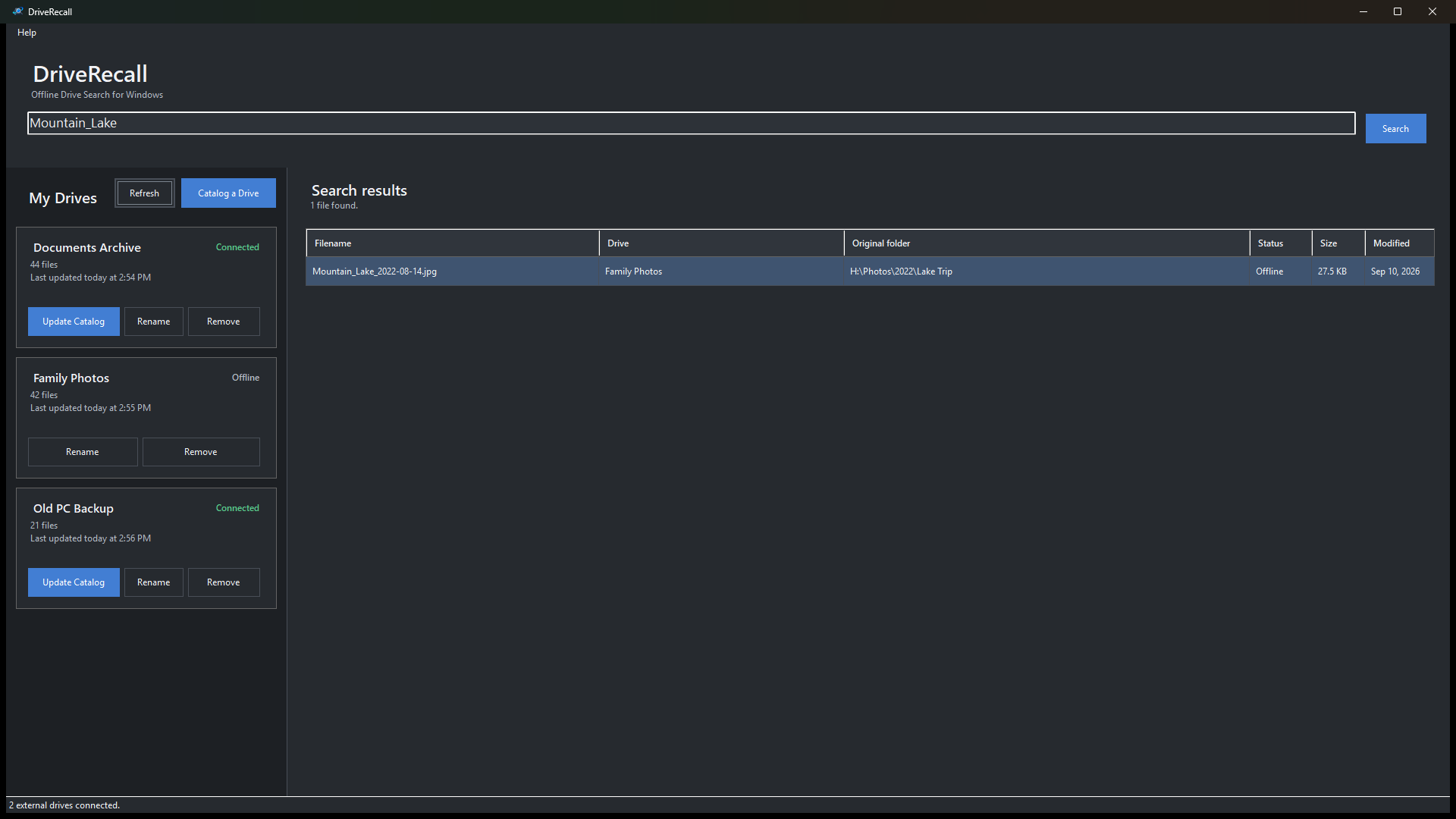
DriveRecall also displays whether cataloged drives are currently connected or offline, helping you distinguish available files from those requiring reconnection.
If you add, rename, move, or delete files on a drive, you can connect it again and update its catalog to reflect those changes.
Designed for Local, Read-Only Drive Cataloging
DriveRecall was designed with a straightforward approach to file cataloging.
It reads the files and folders on supported external drives without changing the source files. Catalog information is stored locally on your Windows PC.
There's no cloud account, online service, or subscription required for its cataloging and search functionality.
It's important to understand what DriveRecall doesn't do. It doesn't recover deleted files, back up your drives, or search inside document contents. It also cannot open files from drives that are disconnected.
Its purpose is simpler: help you remember which drive contains a file and where to find it.
Spend Less Time Searching Through External Drives
External drives are useful for storing files you want to keep but don't need on your computer every day.
The difficulty comes later, when you need to find something and can't remember where you saved it.
By keeping searchable filename catalogs, you can identify the appropriate drive before connecting it, rather than checking several devices individually.
DriveRecall — Offline Drive Search for Windows is available in the Microsoft Store for $14.99 as a one-time purchase in the United States.
View DriveRecall in the Microsoft Store
Published by MaveWay Utilities — maveway.com